Listening to FM radio / DAB(If equipped)
Press the [RADIO] key to change the mode in order of [FM] > [AM] > [DAB] (If equiooed).
|
|
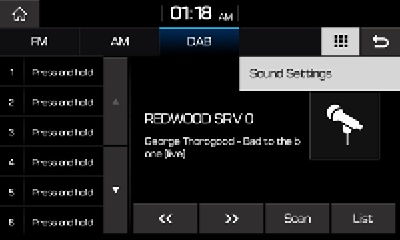
Auto Tuning
Press the  ,
,  button to automatically search for frequencies.
Manual Tuning
Turn the TUNE / ENTER knob to manually select the frequency.
The stations move up and down step by step.
Selecting preset lists
From the lists, select the frequency you want to listen to.
Scan
Press the [Scan] button to save frequencies.
Plays frequencies saved to presets for 5 seconds and moves to the next saved frequency.
Autostore
Press the [Autostore] button to save frequencies with superior reception.
List
Press the [List] button to DAB list screen.
Sound Settings
Press  > [Sound Settings].
For details, refer to the “Sound”.